

extract email addresses from yahoo mail and hotmail Windows offline tool Preview before save

Extract Email Addresses from Yahoo Mail and Hotmail

Extract email addresses from Yahoo Mail and Hotmail mailboxes through IMAP with folder selection, filters, duplicate removal, and local export.

Offline processingYour exports are created on your Windows PC.
Focused filtersNarrow results before saving final output.
Clean exportSave structured output for reporting, backup, or CRM use.
Trial shows preview. Activation is required to save or export.
IMAP Email Extractor

Use one focused workflow for extract email addresses from yahoo mail and hotmail with local preview, filters, and export.
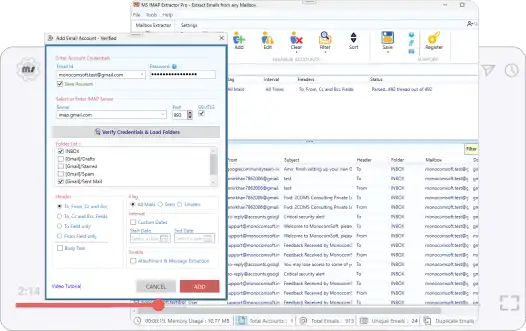
IMAP Email Extractor app preview for Extract Email Addresses from Yahoo Mail and Hotmail
Sources: Gmail, Yahoo Mail, Hotmail, Outlook.com, and IMAP mailboxes

Why users need this workflow

Extract Email Addresses from Yahoo Mail and Hotmail is for teams that need mailbox email exports from Yahoo Mail and Hotmail mailbox folders without slow manual work. The main problem is not only finding data; it is keeping the output clean, traceable, and ready to use after extraction.

This page focuses on the exact intent to extract email addresses from yahoo mail and hotmail. It covers what gets captured, which filters matter, how preview helps avoid bad exports, and what the final output should look like before it is used in a real business workflow.

Exact intent match
Built around the specific workflow to extract email addresses from yahoo mail and hotmail, so the page answers the task directly instead of describing every product feature at once.
Less manual cleanup
Reduces searching live mailboxes folder by folder and copying contact data from message headers, especially when the source set is large or repeated across projects.
Private local handling
Preview and export are handled on the Windows desktop, which helps when the source contains customer, staff, legal, or internal business data.
Export-ready output
Creates CSV, Excel, TXT, or mailbox export data with folder and message context, so the result is easier to use in Excel, CRM tools, audits, migration prep, or backup workflows.
What the tool saves
  • email addresses and message records from Yahoo Mail and Hotmail mailbox folders, including sender, recipient, folder, subject, and date context
  • Source context such as folder, sender, subject, date, file name, or mailbox when available
  • Duplicate-cleaned data for safer reporting and import
  • email lists, mailbox exports, attachments, and local backups
Focused extraction path Local Windows export

From messy source data to usable output

Load Yahoo Mail and Hotmail mailbox folders, work with the right mailbox folders, preview what was found, and save mailbox email exports with the context needed for reporting, backup, migration preparation, CRM cleanup, audit review, and operations work.
Select
Yahoo Mail and Hotmail mailbox folders
Start
Run the scan so IMAP Email Extractor can read the selected mailbox folders and prepare a preview.
Refine
mailbox folder selection, date range, sender, recipient, subject, message content, attachment status, and duplicate cleanup
Export
CSV, Excel, TXT, or mailbox export data with folder and message context
Preview first Remove duplicates Keep data local Ready for Excel or review
IMAP Email Extractor box for extract email addresses from yahoo mail and hotmail

What gets carried through

email addresses and message records from Yahoo Mail and Hotmail mailbox folders, including sender, recipient, folder, subject, and date context stay tied to useful source context such as folder, sender, subject, date, file name, or mailbox where the source provides it.

Best use

  • Run smaller batches when archives are large.
  • Use filters before exporting, not after.
  • Preview the result so the saved file is clean enough for real work.

Step-by-step process

Follow this focused process for extract email addresses from yahoo mail and hotmail. The goal is to control source selection first, then apply filters, then preview, and only then export the final result.

Step 1: Open the right source
Load Yahoo Mail and Hotmail mailbox folders and avoid mixing unrelated sources in the first pass. Smaller, focused runs are easier to verify.
Step 2: Select the right mailbox folders
Choose only the mailbox folders that match the use case. This keeps extraction faster and reduces irrelevant output.
Step 3: Apply intent-specific filters
Use mailbox folder selection, date range, sender, recipient, subject, message content, attachment status, and duplicate cleanup to remove noise before exporting.
Step 4: Preview and clean results
Review the preview, remove duplicates, and confirm that the source context is useful enough for follow-up work.
Step 5: Export locally
Save mailbox email exports in the supported format for reporting, backup, migration preparation, CRM cleanup, audit review, and operations work.
Trial note: Trial supports preview. Saving/exporting requires activation with a license key.
Useful options
  • Preview before save
  • Duplicate removal
  • Date, folder, file, sender, or subject filters
  • Local Windows processing
  • Structured export formats
Common mistakes to avoid
  • Scanning every source at once before testing a smaller batch
  • Exporting before previewing duplicate or irrelevant records
  • Losing source context that may be needed for audit or follow-up
  • Using the wrong output format for CRM, Excel, or backup use

Real use cases

This page targets one exact search intent, but the output supports several practical business needs.

CRM preparation
Create cleaner lists before import or enrichment.
Private review
Keep sensitive data on the local Windows machine.
Audit and research
Turn scattered source data into searchable output.
Backup workflows
Save selected data locally for later reference.

Try IMAP Email Extractor

Extract email addresses from Yahoo Mail and Hotmail mailboxes through IMAP with folder selection, filters, duplicate removal, and local export.


Trial supports preview. Activation is required to save/export.
Need help?
Contact support if you want help choosing the right extraction workflow.
Contact Support

FAQ - Extract Email Addresses from Yahoo Mail and Hotmail

Quick answers for this exact workflow.

Open IMAP Email Extractor, connect or load your source data, choose the folders or files, apply filters, preview results, and export the final output.

Yes. Processing runs locally on your Windows PC. The app connects to the mailbox server through IMAP, then stores previews and exports locally.

Yes. You can review extracted data before export so you can filter, remove duplicates, and confirm the output.

The trial lets you install the software and preview extraction results. Saving and exporting require activation with a license key.