

extract emails and phone numbers from websites Public web data only Preview before export

Extract Emails and Phone Numbers from Websites

Extract emails and phone numbers from websites with Lead Scraper Pro. Scan public pages, remove duplicates and export clean leads to Excel.

Public sourcesUse publicly accessible pages selected by the user.
Email + phone fieldsExtract visible emails, phone numbers, mobile numbers, and source URLs.
Clean exportSave reviewed output for Excel, CSV, TXT, CRM prep, or research.
Use responsibly. Public availability does not automatically mean marketing consent.
Lead Scraper Pro

Use one focused workflow for extract emails and phone numbers from websites with preview, filters, and export.
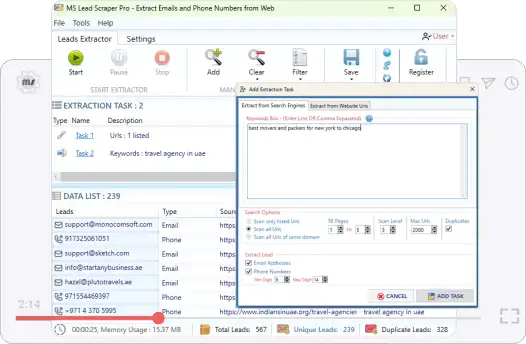
Extract Emails and Phone Numbers from Websites app preview
Sources: public websites

Why users need this workflow

Extract emails and phone numbers from websites by scanning public pages selected by the user. The workflow is designed for visible contact details, review, cleanup, and structured export.

This page focuses on the exact intent to extract emails and phone numbers from websites. It covers public source selection, what gets captured, how preview helps avoid poor exports, and how to keep the final list useful for business review.

Exact intent match
Focused on this single public lead workflow rather than every product feature at once.
Less manual copy-paste
Reduces opening pages one by one, copying emails and phone numbers, and cleaning lists manually.
Public-data boundary
Designed for visible public web data, not private accounts, restricted pages, or hidden records.
Export-ready output
Creates visible email addresses, phone numbers, mobile numbers, and source URLs for sales research, recruiting research, supplier discovery, public contact audits, and website contact collection.
What the tool saves
  • Public email addresses found on selected web pages
  • Public phone and mobile numbers when visible
  • Source URLs for review and traceability
  • Duplicate-cleaned rows for safer reporting and import
  • visible email addresses, phone numbers, mobile numbers, and source URLs
Focused extraction path Public pages only

From public pages to usable lead output

Start with public websites, scan for visible emails and phone numbers, preview what was found, remove duplicates, and export a clean list with source context for sales research, recruiting research, supplier discovery, public contact audits, and website contact collection.

Select
public websites
Scan
Find visible emails and phone numbers on public pages.
Refine
Preview, filter, remove duplicates, and keep source URLs.
Export
Excel, CSV, or TXT lead lists.
Preview first Remove duplicates Public data only Ready for Excel
Lead Scraper Pro product box for extract emails and phone numbers from websites

What gets carried through

Visible emails, phone numbers, mobile numbers, and source URLs stay tied to the reviewed lead output where the source provides them.

Responsible use

  • Use only public pages.
  • Do not bypass logins, restrictions, paywalls, or CAPTCHAs.
  • Review privacy, anti-spam, and phone outreach laws before use.

Step-by-step process

Follow this focused process for extract emails and phone numbers from websites. Select public sources first, preview and filter next, then export the final reviewed list.

Step 1: Choose public sources
Enter relevant keywords, website URLs, or public pages for the research task.
Step 2: Run public lead extraction
Scan visible page content for email addresses, phone numbers, and mobile numbers.
Step 3: Preview and clean results
Review source URLs, remove duplicates, filter unwanted entries, and keep only useful leads.
Step 4: Export locally
Save the reviewed list to Excel, CSV, or TXT for sales research, recruiting research, supplier discovery, public contact audits, and website contact collection.
Responsible use note: Public availability is not the same as marketing consent. Follow applicable rules before outreach.
Useful options
  • Keyword and website URL input
  • Preview before save
  • Duplicate removal
  • Email and phone extraction
  • Excel, CSV, and TXT export
Common mistakes to avoid
  • Using broad keywords before testing a small source set
  • Exporting without reviewing source URLs
  • Mixing email and phone outreach rules
  • Assuming public data always means outreach permission

Real use cases

This page targets one exact search intent, but the output supports several practical business needs.

CRM preparation
Create cleaner lead lists before import or enrichment.
Business research
Collect public business contact details with source references.
Market mapping
Turn public websites into searchable lead datasets.
Manual review
Keep source URLs so exported leads can be checked before use.

Try Lead Scraper Pro

Extract emails and phone numbers from websites with Lead Scraper Pro. Scan public pages, remove duplicates and export clean leads to Excel.


Trial supports preview. Activation is required to save/export.
Need help?
Contact support if you want help choosing the right public lead workflow.
Contact Support

FAQ - Extract Emails and Phone Numbers from Websites

Quick answers for this exact workflow.

Open Lead Scraper Pro, enter public website URLs or search keywords, run extraction, preview visible emails and phone numbers, clean the list, and export the final leads.

No. Use it only for publicly available emails and phone numbers. Do not use it to bypass logins, restrictions, paywalls, CAPTCHAs, or private systems.

Yes. You can review extracted public lead data before export so you can filter, remove duplicates, and confirm source quality.

The trial lets you install the software and preview extraction results. Saving and exporting require activation with a license key.