

export phone numbers to excel Preview before export Excel-ready output

Export Phone Numbers to Excel

Export phone numbers to Excel after scanning public websites or URLs. Preview results, remove duplicates and save XLSX, CSV or TXT.

Focused sourcereviewed public phone number results
Clean reviewPreview, filter, and remove duplicates before saving.
Useful outputXLSX, CSV, or TXT phone exports
Trial supports preview. Activation is required to save/export.
Phone Number Extractor Pro

Use one focused workflow for export phone numbers to excel with preview, filters, and export.
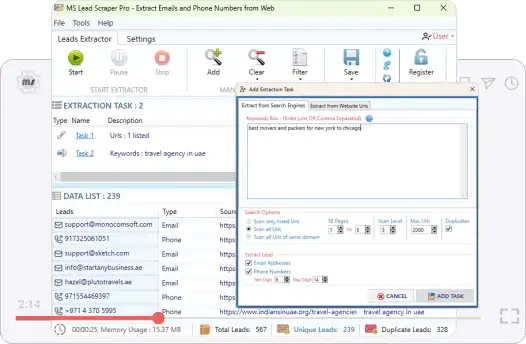
Phone Number Extractor Pro app preview for Export Phone Numbers to Excel
Sources: reviewed public phone number results

Why users need this workflow

Export phone numbers to Excel after scanning public websites or URLs. Preview results, remove duplicates and save XLSX, CSV or TXT.

This page focuses on the exact intent to export phone numbers to excel. It explains the source selection, what gets captured, how preview prevents noisy exports, and how to keep the final output useful for CRM preparation, reporting, sales handoff, manual review, and campaign planning.

Exact intent match
Focused on this one extraction workflow instead of every product feature at once.
Less manual cleanup
Reduces copy-paste work and keeps source context attached to the result.
Clear source boundary
Use only publicly available web pages and search results selected by the user.
Export-ready output
XLSX, CSV, or TXT phone exports for CRM preparation, reporting, sales handoff, manual review, and campaign planning.
What the tool saves
  • public phone and mobile numbers
  • Source context from reviewed public phone number results
  • Duplicate-cleaned rows for safer reporting and import
  • XLSX, CSV, or TXT phone exports
Focused extraction path Review before export

From source data to usable output

Start with reviewed public phone number results, scan for the matching data, preview what was found, remove duplicates, and export a clean list for CRM preparation, reporting, sales handoff, manual review, and campaign planning.

Select
reviewed public phone number results
Scan
Run extraction for export phone numbers to excel.
Refine
Preview, filter, remove duplicates, and keep source context.
Export
XLSX, CSV, or TXT phone exports
Preview first Remove duplicates Responsible use Ready for Excel
Phone Number Extractor Pro product box for export phone numbers to excel

What gets carried through

Matches, source context, and duplicate-cleaned rows stay tied to the reviewed output wherever the source provides them.

Best use

  • Run a smaller test before a large batch.
  • Use filters before exporting, not after.
  • Review source context before import or outreach.

Step-by-step process

Follow this focused process for export phone numbers to excel.

Step 1: Choose the source
Add reviewed public phone number results that match the task.
Step 2: Run extraction
Scan for public phone and mobile numbers using the selected workflow.
Step 3: Preview and clean results
Review source context, remove duplicates, and filter unwanted entries.
Step 4: Export locally
Save XLSX, CSV, or TXT phone exports for CRM preparation, reporting, sales handoff, manual review, and campaign planning.
Workflow note: Use only publicly available web pages and search results selected by the user.
Useful options
  • Preview before save
  • Duplicate removal
  • Source context retention
  • Excel, CSV, and TXT export
Common mistakes to avoid
  • Starting with too broad a source set
  • Exporting without checking source context
  • Mixing reviewed and unreviewed results
  • Assuming every match is ready for production use

Real use cases

This page targets one exact search intent, but the output supports several practical business needs.

CRM preparation
Create cleaner lists before import or enrichment.
Manual review
Keep source references so results can be checked before use.
Research cleanup
Turn messy sources into structured data rows.
Reporting
Create Excel-ready output for team review.

Try Phone Number Extractor Pro

Export phone numbers to Excel after scanning public websites or URLs. Preview results, remove duplicates and save XLSX, CSV or TXT.

Trial supports preview. Activation is required to save/export.
Need help?
Contact support if you want help choosing the right extraction workflow.
Contact Support

FAQ - Export Phone Numbers to Excel

Quick answers for phone number extractor workflows.

Phone Number Extractor Pro extracts public phone and mobile numbers from public websites, URL lists, domains, and search-result workflows.

Yes. Preview, filter, remove duplicates, and confirm source quality before saving the final file.

Use Excel, CSV, or TXT output depending on the workflow and downstream review needs.

The trial lets you install the software and preview extraction results. Saving and exporting require activation with a license key.