

Extract Custom Data with Regex
Extract custom data with Regex from local files. Use preset or custom patterns for URLs, dates, IDs, codes, metadata and text matches.

Use one focused workflow for extract custom data with regex with preview, filters, and export.
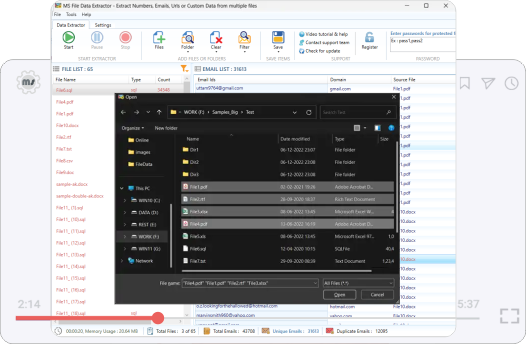
Why users need this workflow
Extract custom data with Regex from local files. Use preset or custom patterns for URLs, dates, IDs, codes, metadata and text matches.
This page focuses on the exact intent to extract custom data with regex. It explains the source selection, what gets captured, how preview prevents noisy exports, and how to keep the final output useful for ID extraction, date collection, code audits, metadata review, and custom text mining.
- emails, phone numbers, URLs, dates, metadata, HTML tags, and custom Regex matches
- Source context from files that need custom pattern matching
- Duplicate-cleaned rows for safer reporting and import
- Regex match exports with file source context
From source data to usable output
Start with files that need custom pattern matching, scan for the matching data, preview what was found, remove duplicates, and export a clean list for ID extraction, date collection, code audits, metadata review, and custom text mining.
What gets carried through
Matches, source context, and duplicate-cleaned rows stay tied to the reviewed output wherever the source provides them.
Best use
- Run a smaller test before a large batch.
- Use filters before exporting, not after.
- Review source context before import or outreach.
Step-by-step process
Follow this focused process for extract custom data with regex.
- Preview before save
- Duplicate removal
- Source context retention
- Excel, CSV, and TXT export
- Starting with too broad a source set
- Exporting without checking source context
- Mixing reviewed and unreviewed results
- Assuming every match is ready for production use
Real use cases
This page targets one exact search intent, but the output supports several practical business needs.
Try File Data Extractor
Extract custom data with Regex from local files. Use preset or custom patterns for URLs, dates, IDs, codes, metadata and text matches.
FAQ - Extract Custom Data with Regex
Quick answers for file data extractor workflows.