

extract emails and phone numbers from files Preview before export Excel-ready output

Extract Emails and Phone Numbers from Files

Extract emails and phone numbers from documents and folders. Preview, filter and export contact data from local files on Windows.

Focused sourcemixed document folders
Clean reviewPreview, filter, and remove duplicates before saving.
Useful outputemail and phone exports with source file context
Trial supports preview. Activation is required to save/export.
File Data Extractor

Use one focused workflow for extract emails and phone numbers from files with preview, filters, and export.
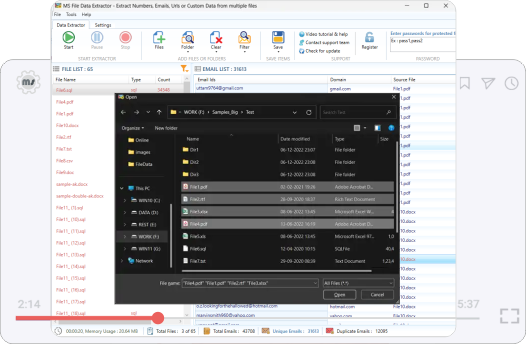
File Data Extractor app preview for Extract Emails and Phone Numbers from Files
Sources: mixed document folders

Why users need this workflow

Extract emails and phone numbers from documents and folders. Preview, filter and export contact data from local files on Windows.

This page focuses on the exact intent to extract emails and phone numbers from files. It explains the source selection, what gets captured, how preview prevents noisy exports, and how to keep the final output useful for contact recovery, customer record cleanup, research archive review, and CRM preparation.

Exact intent match
Focused on this one extraction workflow instead of every product feature at once.
Less manual cleanup
Reduces copy-paste work and keeps source context attached to the result.
Clear source boundary
Files are processed locally on your Windows PC. Use documents you are allowed to process.
Export-ready output
email and phone exports with source file context for contact recovery, customer record cleanup, research archive review, and CRM preparation.
What the tool saves
  • emails, phone numbers, URLs, dates, metadata, HTML tags, and custom Regex matches
  • Source context from mixed document folders
  • Duplicate-cleaned rows for safer reporting and import
  • email and phone exports with source file context
Focused extraction path Review before export

From source data to usable output

Start with mixed document folders, scan for the matching data, preview what was found, remove duplicates, and export a clean list for contact recovery, customer record cleanup, research archive review, and CRM preparation.
Select
mixed document folders
Scan
Run extraction for extract emails and phone numbers from files.
Refine
Preview, filter, remove duplicates, and keep source context.
Export
email and phone exports with source file context
Preview first Remove duplicates Responsible use Ready for Excel
File Data Extractor product box for extract emails and phone numbers from files

What gets carried through

Matches, source context, and duplicate-cleaned rows stay tied to the reviewed output wherever the source provides them.

Best use

  • Run a smaller test before a large batch.
  • Use filters before exporting, not after.
  • Review source context before import or outreach.

Step-by-step process

Follow this focused process for extract emails and phone numbers from files.

Step 1: Choose the source
Add mixed document folders that match the task.
Step 2: Run extraction
Scan for emails, phone numbers, URLs, dates, metadata, HTML tags, and custom Regex matches using the selected workflow.
Step 3: Preview and clean results
Review source context, remove duplicates, and filter unwanted entries.
Step 4: Export locally
Save email and phone exports with source file context for contact recovery, customer record cleanup, research archive review, and CRM preparation.
Workflow note: Files are processed locally on your Windows PC. Use documents you are allowed to process.
Useful options
  • Preview before save
  • Duplicate removal
  • Source context retention
  • Excel, CSV, and TXT export
Common mistakes to avoid
  • Starting with too broad a source set
  • Exporting without checking source context
  • Mixing reviewed and unreviewed results
  • Assuming every match is ready for production use

Real use cases

This page targets one exact search intent, but the output supports several practical business needs.

CRM preparation
Create cleaner lists before import or enrichment.
Manual review
Keep source references so results can be checked before use.
Research cleanup
Turn messy sources into structured data rows.
Reporting
Create Excel-ready output for team review.

Try File Data Extractor

Extract emails and phone numbers from documents and folders. Preview, filter and export contact data from local files on Windows.

Trial supports preview. Activation is required to save/export.
Need help?
Contact support if you want help choosing the right extraction workflow.
Contact Support

FAQ - Extract Emails and Phone Numbers from Files

Quick answers for file data extractor workflows.

File Data Extractor extracts emails, phone numbers, URLs, dates, metadata, HTML tags, and custom Regex matches from PDF, Word, Excel, CSV, TXT, HTML, and folders.

Yes. Preview, filter, remove duplicates, and confirm source quality before saving the final file.

Use Excel, CSV, or TXT output depending on the workflow and downstream review needs.

The trial lets you install the software and preview extraction results. Saving and exporting require activation with a license key.